Cite AI Now Has MCP: What It Means for Your AI Search Visibility Strategy
Share this Article:


MCP changes how AI visibility data fits into your workflow.
Instead of switching between dashboards, exports, and separate research processes, MCP allows AI visibility insights to move directly into the environments where teams already think, analyze, and make decisions.
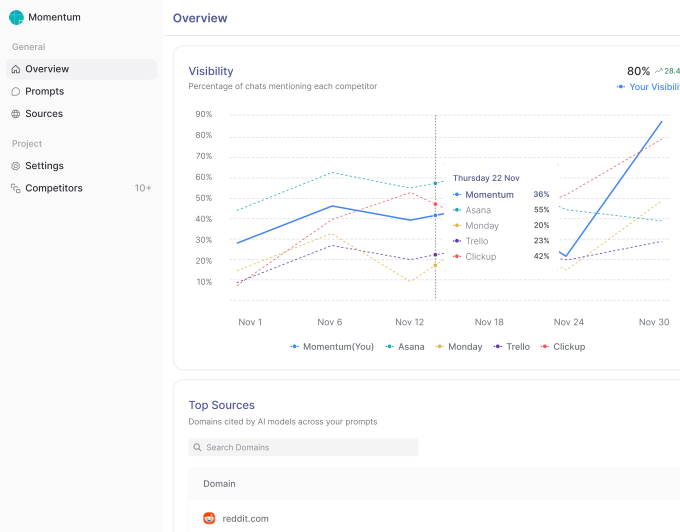
With Cite AI’s MCP, you can work with real-time brand visibility data inside your AI assistant, including prompt performance, share of voice, citations, competitor visibility, and source influence across platforms like ChatGPT, Gemini, Perplexity, and Google AI.
That matters because AI search visibility is not static. Recommendations change constantly based on prompts, sources, and evolving platform behavior. The faster teams can analyze those shifts, the faster they can adapt content, positioning, and authority-building strategies.
In this article, we explore why MCP matters for AI search, how it changes the way teams interact with visibility data, and why integrated AI-native workflows are becoming an important part of modern search strategy.
What MCP Is and How It Changes AI Search Workflows
Model Context Protocol, or MCP, is an open standard that lets AI assistants connect directly to external tools and data sources. Instead of copying data out of a platform and pasting it into a conversation, MCP creates a live connection so the AI assistant can query that data on its own, in context, as part of your workflow.
Standard API integrations require you to build connections yourself, manage authentication layers, and write custom logic to surface the right data at the right time. Plugins work within narrow, predefined scopes. MCP operates differently. It gives AI assistants a structured way to understand what a tool does, what data it holds, and how to request it. The result is a connection that feels native rather than bolted on.
For anyone working with AI-native workflows, this matters because it removes the friction between your AI assistant and the data it needs to give you useful answers. Cite AI now has MCP, which means your brand visibility data becomes part of the conversation, not something you look up separately.
What Cite AI’s MCP Actually Does
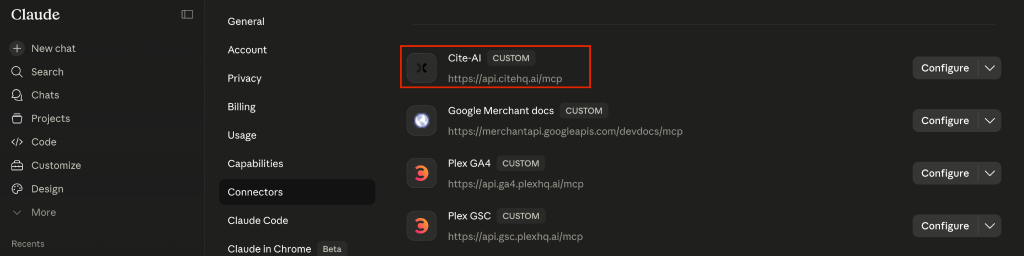
Cite AI’s MCP integration gives you direct access to your brand visibility data from inside ChatGPT, Claude, and other AI assistants that support MCP connections. You can query brand mention tracking, share of voice metrics, citation data, and AI search visibility trends without switching tabs or running a separate report.
The key difference is context. When you ask an AI assistant a question about your brand’s performance, it can pull the actual data from Cite AI in real time and incorporate it into its response. You’re not getting a generic summary. You’re getting your numbers, your competitors, your citation sources, surfaced in the moment you need them.
This makes AI search visibility data usable at the speed of a conversation. Instead of exporting a report and interpreting it manually, you ask a question and get an answer built from your live data.
What You’ll Need Before You Connect
To use Cite AI’s MCP integration, you need an active Cite AI account with data already being tracked for your brand. MCP access is available on supported plans, so check your subscription tier if you’re unsure whether it’s included.
On the AI assistant side, you need a platform that supports MCP connections. Claude currently supports MCP, and ChatGPT support is also available with compatible tool integrations enabled. The MCP ecosystem is expanding, so this list will continue to grow.
Setting Up the Connection
Start inside your Cite AI dashboard. Navigate to the Integrations section and select MCP Setup.
From there, you can connect Cite AI directly to your supported AI assistant. As long as you have an active Cite AI subscription with MCP access enabled, the connection process is straightforward.
Once connected, your AI assistant will recognize Cite AI as an available MCP tool and can start querying your AI visibility data directly inside conversations.
Your First Queries Inside an AI Assistant
Once connected, you can start asking questions directly. Try prompts like: “What is my brand’s share of voice on AI platforms this week?” or “Which sources are citing my brand most often in AI-generated answers?” or “How does my visibility compare to [competitor] across ChatGPT and Perplexity?”
Responses come back with your actual data rather than general guidance. Compared to checking Cite AI directly, the difference is that the AI assistant can help you interpret the data, connect it to other contexts in your conversation, and suggest next steps, all in one place.
Practical Ways Teams Use Cite AI MCP
During live research sessions, you can monitor how AI platforms mention your brand in real time without breaking your flow. If you’re analyzing a market or preparing a strategy document, you can pull your brand mention data into the same conversation where you’re doing the thinking.
Comparing share of voice against competitors becomes a single query rather than a multi-step process. You ask, the assistant pulls the data from Cite AI, and you get a comparison with context. Pulling citation and source influence data to inform content decisions works the same way. You can see which sources are driving your AI citations and make informed decisions about where to build authority.
For marketing teams and agencies, this also compresses reporting time. Instead of building reports from exported data, you can query, summarize, and package insights from inside the AI assistant itself.
Who Gets the Most Value from Cite AI MCP
Marketing teams running AI visibility audits at scale benefit most from the speed. Querying multiple brands, platforms, and time periods in a single session replaces what used to take hours of manual reporting.
SEO professionals shifting focus toward AI-generated answer optimization need data that reflects how AI systems actually respond to user prompts. Cite AI’s MCP delivers exactly that, in context, where the strategic thinking is already happening.
Agencies managing multiple brand clients across AI platforms can move between client data sets inside a single AI assistant session, making it practical to track and compare visibility across a full portfolio. Startups tracking early-stage brand presence in AI search results get a clear signal on whether they’re appearing at all, and where to focus to change that.
How Cite AI MCP Fits Into a Broader AI Search Strategy
MCP is one layer in a full AI visibility stack. It connects your data to your workflow, but the strategy still depends on what you do with that data. Prompt performance, content decisions, and source authority building all require ongoing analysis. What MCP does is make that analysis faster and more integrated.
Working with real-time brand data inside your AI assistant means your decisions are grounded in what’s actually happening across user-facing AI responses, not just API outputs or crawled indexes. That distinction matters because AI platforms don’t always behave the way their APIs suggest. The only way to know how they talk about your brand is to track the actual responses users receive.
Using Cite AI’s MCP, you can tie prompt performance insights and AI-driven search trends directly into the content and positioning work you’re already doing, without creating a separate research step outside your normal flow.
AI-native brand intelligence isn’t a future capability. It’s available now, and the advantage goes to teams that act on visibility data inside their workflow rather than around it. Cite AI MCP makes that practical.
Track how AI talks about your brand with Cite AI.
Start writing with confidence
Verify your content, add real citations, and publish with trust.