
 Documentation
 -
-
 Start Tracking Your Brand
 - Brand Profile
- Prompt Setup Guide
- Track Competing Brands
-
-
-
Take Actions
- Actions
-
-
-
 Agent Analytics
 - Connect Cloudflare
- Crawl Insights
- AI Referrals
- Crawlability
- Use Cases
-
 Get Started
 AI Shopping
 Track Competing Brands
Understand which brands AI platforms recommend alongside, or ahead of, your brand.
Competitor tracking gives context to your visibility data by showing how your brand compares across AI-generated responses.
Cite AI helps you monitor:
- competitor visibility
- share of voice
- brand position
- citation patterns
- and market movement across platforms like ChatGPT, Gemini, Google AI Overviews, Google AI Mode, and Perplexity
This helps identify where your brand leads, where competitors dominate, and where visibility opportunities exist.
Why Competitive Tracking Matters
Visibility metrics are most valuable when measured against competitors.
A visibility score only tells part of the story. Comparing performance across competing brands reveals:
- what strong visibility looks like in your category
- how AI platforms position your brand
- and where competitors consistently outperform you
For example:
- 15% visibility may seem strong
- but if competitors average 40%+, there is still major opportunity to grow
What Competitive Tracking Helps You Understand
Benchmark Your Visibility
Compare your performance directly against competing brands.
Identify Visibility Gaps
Find prompts and topics where competitors appear more consistently.
Monitor Market Changes
Track shifts in visibility across both established and emerging brands.
Understand Brand Positioning
See whether your brand is:
- leading the category
- competing closely
- or underrepresented in AI-generated recommendations
Add Brands to Track
Navigate to the Brands section in your sidebar to manage competitors and brand tracking.
Cite AI supports:
- AI-generated competitor suggestions
- manual brand setup
- advanced mention matching
Available Actions
- Track Brand – Add the competitor to your tracking setup.
- Dismiss Suggestion – Remove irrelevant competitor recommendations.
Manually Add Competitors
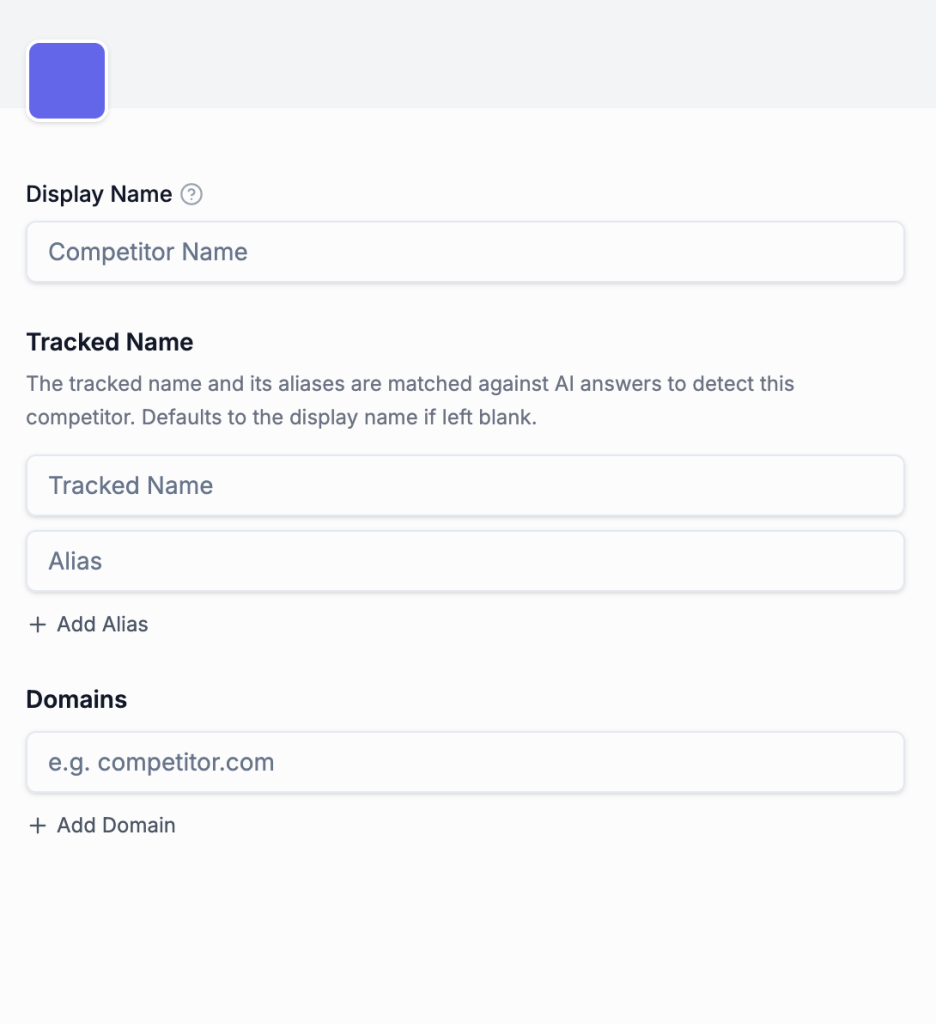
You can also create competitor profiles manually.
How to Add a Competitor
- Open the Brands section
- Click Add Brand
- Enter competitor details
- Save changes
Alternate Brand Names
Aliases help detect:
- abbreviations
- alternate spellings
- shortened names
- and common variations
This improves visibility detection across different AI responses.
Brand Domain
Add the competitor’s primary website domain.
Domains help classify:
- citations
- source ownership
- and referenced websites
Best Practices for Competitor Tracking
Start With Direct Competitors
Track brands competing for the same audience and prompts.
Keep Brand Names Simple
Use the versions AI platforms naturally reference.
Review AI Responses Frequently
Update aliases based on how AI models reference competitors over time.
Expand Your Tracking Gradually
As visibility tracking matures, add:
- emerging brands
- adjacent competitors
- category leaders
- and alternative solutions
This creates a more complete view of your competitive AI landscape.
 On this page
- Why Competitive Tracking Matters
- What Competitive Tracking Helps You Understand
- Benchmark Your Visibility
- Identify Visibility Gaps
- Monitor Market Changes
- Understand Brand Positioning
- Add Brands to Track
- Available Actions
- Manually Add Competitors
- How to Add a Competitor
- Alternate Brand Names
- Brand Domain
- Best Practices for Competitor Tracking
- Start With Direct Competitors
- Keep Brand Names Simple
- Review AI Responses Frequently
- Expand Your Tracking Gradually