
 Documentation
 -
-
 Start Tracking Your Brand
 - Brand Profile
- Prompt Setup Guide
- Track Competing Brands
-
-
-
Take Actions
- Actions
-
-
-
 Agent Analytics
 - Connect Cloudflare
- Crawl Insights
- AI Referrals
- Crawlability
- Use Cases
-
 Get Started
 AI Shopping
 Prompt Setup Guide
Learn how to build a prompt tracking system that accurately reflects how users interact with AI platforms.
Prompts power everything inside Cite AI. They determine what gets tracked, how visibility is measured, and where your brand appears across AI-generated answers.
By the end, you’ll have a complete framework for monitoring your brand across platforms like ChatGPT, Gemini, Google AI Overviews, Google AI Mode, and Perplexity.
Understanding Prompts
AI platforms behave differently from traditional search engines.
Instead of matching exact keywords, models interpret:
- user intent
- conversational context
- constraints
- and meaning
This changes how visibility should be tracked.
Prompts vs Traditional Keywords
Traditional search engines rely heavily on keyword matching.
AI platforms understand both keywords and conversational intent.
Some AI prompts are still short keyword-style queries, such as:
- “best CRM software”
- “top project management tools”
- “best protein brand”
Others are more conversational and detailed:
- “What CRM is best for a remote sales team with under 20 employees?”
- “Which project management tool works best for design agencies?”
- “What’s the healthiest protein snack brand for working professionals?”
The key difference is that AI models interpret:
- intent
- context
- comparisons
- constraints
- and meaning
not just exact keyword matching.
This means prompts can range from simple search-style queries to highly conversational questions, and both influence AI visibility differently.
How AI Platforms Process Prompts
Models like ChatGPT, Gemini, and Perplexity evaluate prompts in multiple layers before generating responses.
Intent Detection
The AI first determines what the user wants.
Examples:
- “What’s the best…” → recommendations
- “Compare…” → evaluations
- “How do I…” → instructional answers
Intent strongly influences which brands appear.
Context Evaluation
The model then processes additional details that shape the response.
Examples:
- audience type
- business size
- budget
- industry
- use case
Context changes visibility outcomes significantly.
Response Construction
The AI combines intent and context to generate a final answer.
Because models understand semantic similarity, prompts with similar meaning often produce similar brand recommendations.
For example:
- “Best CRM software”
- “Which CRM should I choose?”
may generate very similar outputs.
What This Means for Tracking
Exact wording is less important
You do not need endless prompt variations.
Instead, focus on:
- different intents
- different use cases
- different audience contexts
Informational prompts often exclude brands
Generic informational prompts may not surface companies naturally.
Example:
“How do I improve customer support?”
This may return advice instead of tools or brands.
To improve brand tracking:
- include platform intent
- mention tools, products, or software categories
Example:
“What customer support platforms work best for ecommerce brands?”
Structuring Effective Prompts
Strong prompts usually contain two components:
| Component | Purpose |
| Intent | What the user wants |
| Context | Specific conditions or constraints |
Example
“What’s the best analytics platform for Shopify brands?”
- Intent: “best analytics platform”
- Context: “for Shopify brands”
Well-structured prompts produce more useful visibility tracking.
Organizing Your Tracking System
Cite AI uses Topics to help structure your visibility tracking.
Using Topics
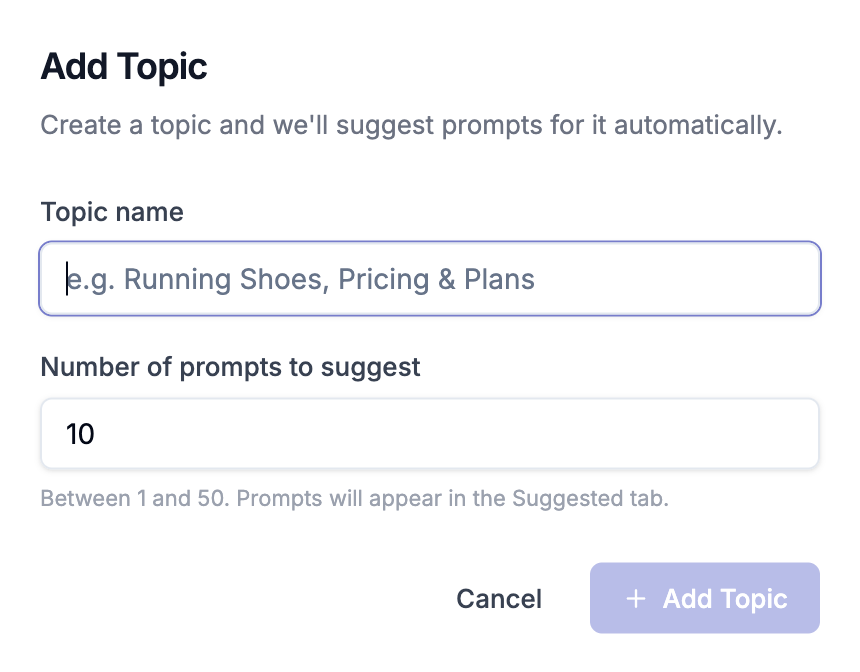
Topics group related prompts into categories.
This helps:
- organize tracking
- compare visibility across categories
- identify strengths and gaps
- improve reporting clarity
AI Search Visibility
Prompts around AI SEO and visibility tracking
Ecommerce Growth
Prompts focused on Shopify, retention, and conversion
Marketing Analytics
Prompts about attribution, reporting, and analytics platforms
Customer Support
Prompts related to support software and automation
Setting Up Your First Topics
Start with a few broad visibility categories.
Recommended Process
- Define your main product or market categories
- Create a topic for each category
- Add prompts relevant to those categories
- Expand over time as tracking evolves
A structured setup makes long-term analysis significantly easier.
Adding Prompts
Cite AI supports multiple prompt creation workflows depending on scale and preference.
Navigate to the Prompts section to begin.
Option 1: AI Prompt Suggestions
Cite AI can generate prompt recommendations using:
- your website
- industry signals
- existing prompts
- competitor context
Workflow
- Open the Suggested tab
- Review recommendations
- Activate relevant prompts
- Generate additional suggestions anytime
Activated prompts immediately enter the tracking cycle.
Option 2: Manual Prompt Creation
Add prompts one at a time or in batches.
Steps
- Click Add Prompt
- Enter prompts
- Choose tracking location
- Add topics
- Save
Location matters because AI responses can vary across countries and regions.
Option 3: Bulk Prompt Upload
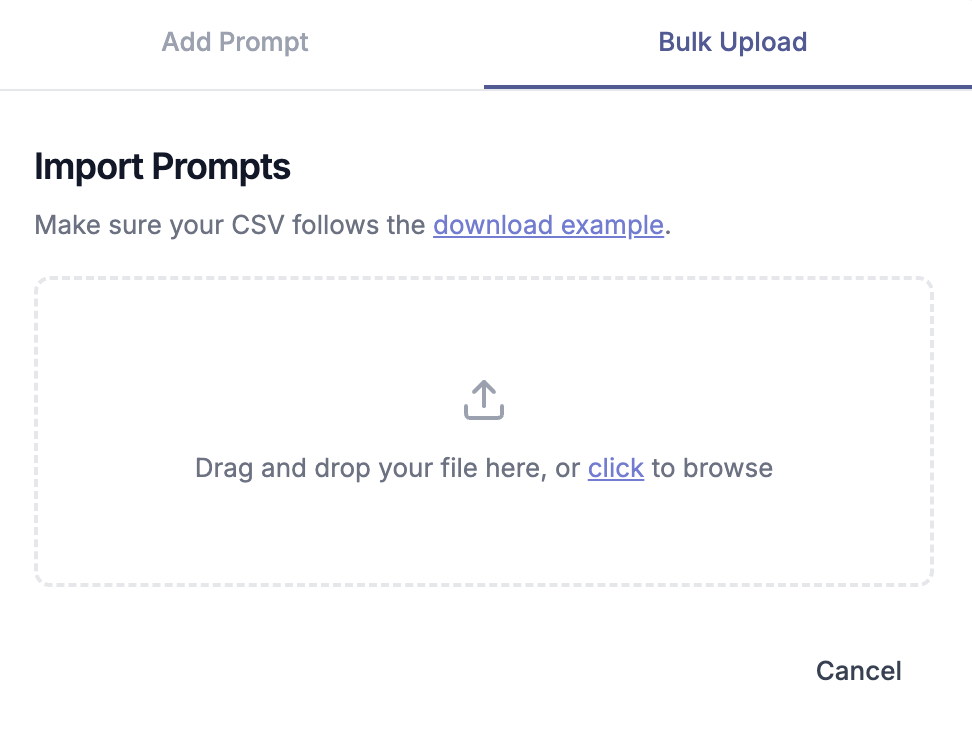
Import large prompt sets through CSV upload.
Supported Fields
| Column | Purpose |
| Prompt | Prompt text |
| Country | Tracking location |
| Topic | Prompt category |
Imported prompts begin tracking automatically after upload.
Managing Prompt Limits
Each plan includes a maximum number of active prompts.
Active Prompts
Run daily and count toward your limit.
Archived Prompts
Preserve historical data without consuming prompt capacity.
Deleted Prompts
Permanently remove prompts and associated history.
Suggested Prompts
Do not count until activated.
Archiving allows teams to refine tracking strategies without losing historical visibility data.
This means AI visibility is not just about tracking exact phrases. It’s about understanding the different ways users ask, compare, discover, and evaluate brands across AI platforms.
 On this page
- Understanding Prompts
- Prompts vs Traditional Keywords
- How AI Platforms Process Prompts
- Intent Detection
- Context Evaluation
- Response Construction
- What This Means for Tracking
- Exact wording is less important
- Informational prompts often exclude brands
- Structuring Effective Prompts
- Example
- Organizing Your Tracking System
- Using Topics
- AI Search Visibility
- Ecommerce Growth
- Marketing Analytics
- Customer Support
- Setting Up Your First Topics
- Recommended Process
- Adding Prompts
- Option 1: AI Prompt Suggestions
- Option 2: Manual Prompt Creation
- Option 3: Bulk Prompt Upload
- Managing Prompt Limits
- Active Prompts
- Archived Prompts
- Deleted Prompts
- Suggested Prompts